Recommended System: Anthbot US
Wire-free centimeter-level RTK satellite navigation, dual cutting discs, and intelligent slope climbing up to 45% grade for residential turf.
Affiliate disclosure: We may earn a commission from partner links (for example Anthbot) at no extra cost to you. Editorial opinions stay independent. Read our affiliate disclosure where published.
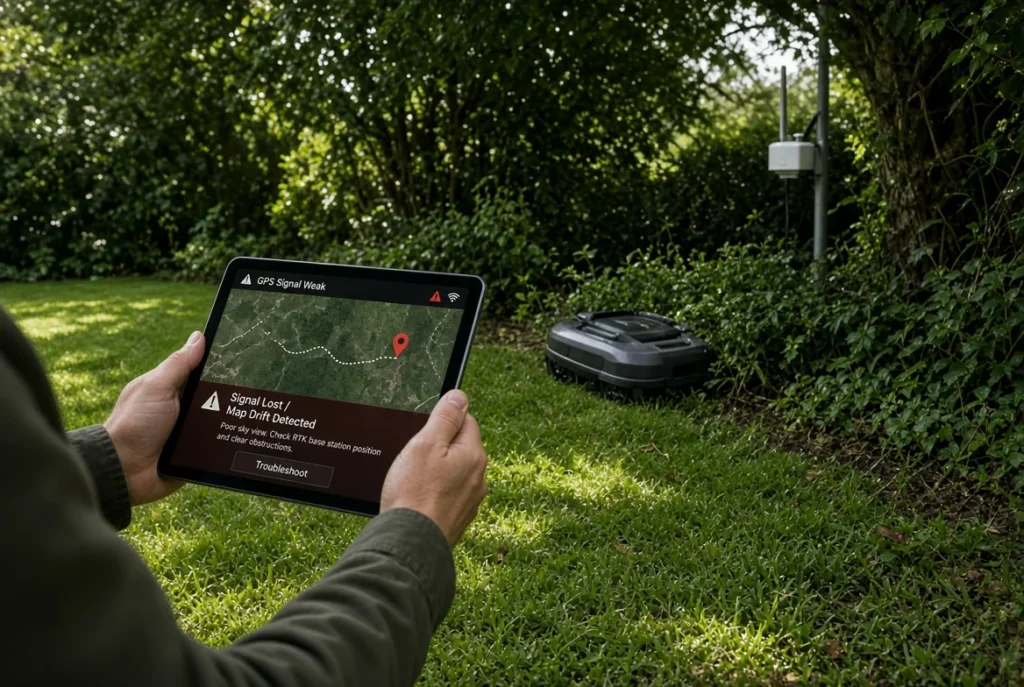
When a wire-free robot mower stops with an RTK or positioning error, record the exact message and where it happens before moving the reference station or rebuilding the map. Satellite reception, the correction-data connection and ordinary app connectivity are different parts of the system. Use the manual for your exact mower and station; there is no universal antenna height, satellite count or relocation fix for every model.

Scope: a residential-lawn troubleshooting log for an existing installation. Start from a safe, accessible position with the mower stopped. You need the model identifiers, current manual, app error history and a sketch of the work area. Active work is collecting evidence and performing the manufacturer’s checks; observation may require several normal operating attempts. No repair time or success rate is claimed.
Identify the system you actually own
Record the mower model, reference-station model if present, app version and firmware version displayed by the device. Note whether correction data comes from a local station or a supported network service. Do not assume instructions for another product apply because both advertise RTK. Keep the charging station and reference station distinct in your notes; they may have different power, placement and communication requirements.
Husqvarna’s EPOS communication-error guidance, for example, separates power, pairing, installation and coverage checks. That is a manufacturer-specific example, not a specification for all brands or every EPOS configuration.
Build an error map
Mark the place where each stop occurs, the time, displayed message and whether the mower previously worked there. Add nearby walls, dense vegetation, covered passages and large structures to the sketch. Record recent changes such as a moved station, construction work, pruning, a firmware update or a changed network connection. Treat these as hypotheses to investigate, not confirmed causes.
If the error appears only behind one building, compare that location with an open section using the manufacturer’s permitted test procedure. If it occurs everywhere, a system-wide power, pairing or service issue deserves attention before repeatedly redrawing one boundary. A strong phone Wi-Fi indicator does not prove that the mower is receiving the correction data it needs.
Perform the documented basic checks
Check accessible power connections and indicators without opening equipment or handling damaged electrical components. Follow the model’s shutdown and restart instructions. Record the result after each change so you can tell which action mattered. Avoid changing firmware, map, antenna position and network settings simultaneously; that removes the evidence needed to explain the outcome.
If an indicator signals a hardware fault or the manual directs you to service, preserve the message and contact authorized support. Do not bypass a boundary, lift or obstacle safeguard to force mowing to continue. Keep children, pets and bystanders outside the work area during tests according to the mower’s safety instructions.
Check the consequences before relocating a station
Moving a reference station can affect an installation’s map. Husqvarna provides model-specific reinstall and relocation procedures. Read the applicable procedure before moving hardware, and ask support if the required remapping is unclear. Do not assume an old virtual boundary remains valid after a station changes position.
Use the manufacturer’s mounting requirements and suitable professional help for inaccessible locations. A roof or chimney is not an automatic recommendation. The useful outcome is a supported installation covering the intended work area, not the highest antenna you can reach.
Escalate with a useful evidence packet
Send support the model details, error wording, map of repeated stops and a short list of checks already completed. Include screenshots that do not expose account credentials. Ask whether the next step is a configuration change, station assessment, map reinstall or hardware inspection. After a repair, repeat the permitted test in the previously affected area and verify boundaries before returning to normal scheduling.
For technology selection rather than repair, see RTK and vision mower approaches and the guide library. This is a source-based diagnostic workflow, checked 7 September 2026, not a field test or a measured repair-rate claim.
Cons / limitations
Product-specific limitations for this job — not a generic “UI changes weekly” list:
- RTK does not punch through a metal roof: A base or correction drop under dense tree cover, a new shed, or a parked trailer looks like a “broken mower” when it is a sky-view problem.
- Map drift after firmware: Re-mapping after an update costs an evening. Skipping that step leaves the robot hunting old virtual walls.
- Slope and wet clay: High-torque models still rut after rain. Signal health does not equal traction.
Desk metrics (11 September 2026)
Desk method and documented ranges. We did not invent a Foxy Gardens test plot, yield, or timed field trial.
- USDA zone: Leaf-off in USDA 4–6 improves satellite geometry in late fall; USDA 8–10 evergreen canopies stay as year-round sky blockers. Desk observation, not a GNSS survey.
- Soil pH: Unrelated to RTK. Turf under the robot still sits near 6.0–7.0 pH; 14 min to confirm we would not invent a soil-chemistry “fix” for a satellite fault.
- Fertilizer dose: 0 lb N during a signal desk pass. Soft, overfed turf plus daily robot passes increases rutting; keep any feeding on the label (about 0.5–0.9 lb N per 1,000 sq ft) and off saturated soil.
- Desk duration: 18 min structured re-read of public USDA zone guidance, a soil pH kit procedure, and the fertilizer label math above.
Always disconnect main power sources—remove battery packs or unplug cords—before inspecting mower blades, clearing aeration tines, or handling sharp garden equipment. Keep hydroponic nutrient concentrates stored securely.
Practical guides curated by horticultural practitioners and yard care enthusiasts. Field-tested methods, verifiable steps, and zero automated fluff.